
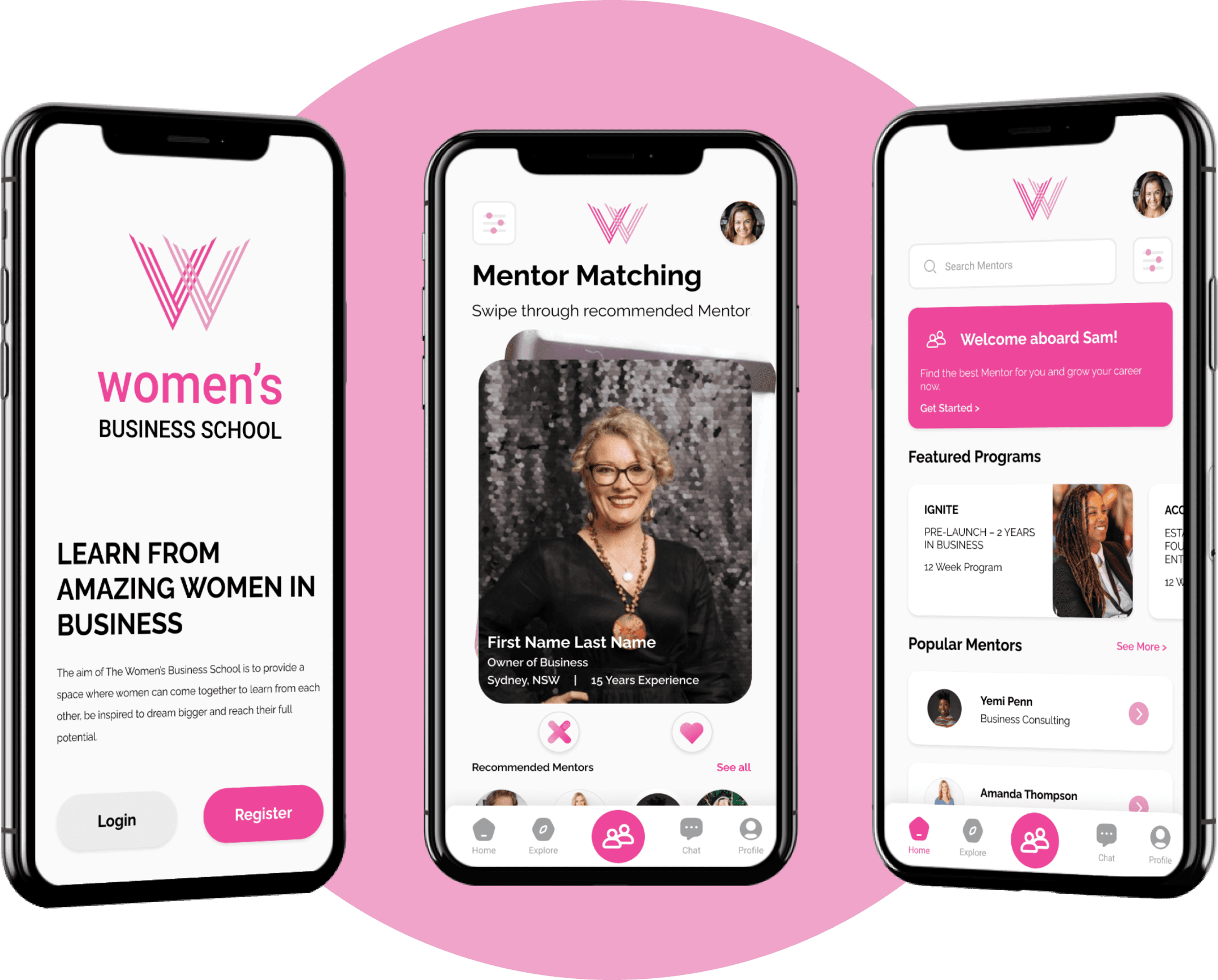
Connecting career changing women around the world with the right mentors
UX Research
UI Design
Mobile App
AI / ML Feature
Figma
React Native
End-to-End
Background
The Women's Business School supports women in small business through online education and community. A previous Capstone team built the learning and community sections of the app. My team was handed the codebase, brand guidelines, and one directive: design and build an AI mentor matching feature. No spec, no wireframes we started from scratch.
Challenge
Users need to trust the system, feel the match is personalised, and understand what they're signing up for all within an existing brand. Design decisions had immediate development consequences, as I was also the front-end developer.
Client

The Women's Business School
My Role
Lead UI Designer
Front-End Developer
Documentation
Team
4 Cross-functional
02_Research
Understanding the space before designing a single screen
Research into target users and the client project laid the foundation we needed. We were provided with previous project code, brand guidelines, and a project brief. From there, we established scope across two capstone semesters.
Research goals
Understand the mentor matching platform market
Identify the target audience of the app
Analyse competitor strengths and weaknesses
Discover people's experience finding suitable mentors
Methodologies
Secondary: market & competitive analysis
Primary: user interviews (n=5)
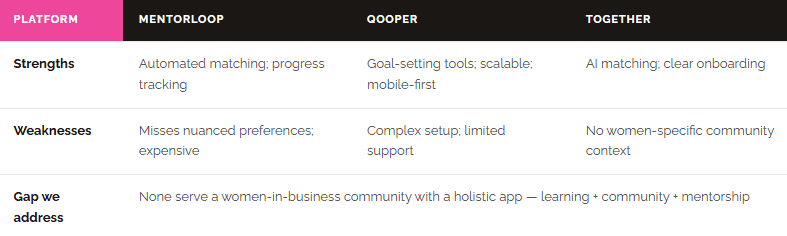
Competitive Analysis
Three direct competitors were analysed to identify strengths, weaknesses, and feature gaps our app could address.
User Personas
From the research I developed two personas representing the two sides of every match. These weren't decorative they became a constant reference point throughout design reviews, keeping design decisions grounded in real needs throughout the project.
Sam
"I've been struggling to advance in my career and I know mentorship could help, but finding the right mentor feels impossible."
Goals
Advance in her career by gaining industry insights and guidance from experienced professionals.
Develop business skills and expand her professional network.
Build confidence in her abilities and decision making by receiving validation and encouragement from successful mentors.
Frustrations
Difficulty finding mentors who understand the unique challenges she faces.
Lack of clarity on finding a mentor suitable for her on her own.
Feeling overwhelmed by the vast amount of information and options available regarding finding mentors in other applications.
Experiencing doubt finding a mentor that can help her hindering her goals.
Amira
"I want to give back and support other women in their career journeys, but matching process seems overwhelming."
Goals
Share her knowledge and experiences to empower other women
Expand her leadership skills by mentoring aspiring professionals
Foster connections with mentees and create and grow a supportive network
Stay updated on new trends and perspectives in the field by engaging in discussions and knowledge-sharing with mentees
Frustrations
Uncertainty about how to find mentees and manage mentoring relationships.
Struggling to find a simple process that isn't too straining on her current focuses.
Feeling disconnected from upcoming people in the industry due to lack of ability to network efficiently and create connections.
Primary Research - User Interviews
Five participants similar to the provisional personas were interviewed about their mentorship experience. Participants: 3 Early Career Professionals, 1 Experienced Mentor, 1 Career Changer.
Users want AI mentor matching | Validated (5/5)
All five participants expressed interest, citing convenience and potential for more personalised matches.
AI can provide accurate matches | Not Validated (2/5)
3/5 participants were sceptical about AI understanding nuanced personal and professional preferences.
Users will share info for better results | Validated (4/5)
Four participants were willing to provide detailed information. One raised privacy concerns.
All participants were actively seeking or had previously sought mentors for career development.
"I need guidance on how to navigate the early stages of my career, but I want to find someone who actually aligns with where I want to go."
Early Career Professional, Interview Participant
03_Strategy
Turning insight into a scope the whole team could build from
With a cross-functional team across design and AI/ML development, we needed shared artefacts to stay aligned on what to build and in what order. How Might We statements transformed research insights into actionable design questions. MoSCoW prioritisation then aligned the team on scope before any design work began.
Must Have Phase 1
Parked for Phase 2
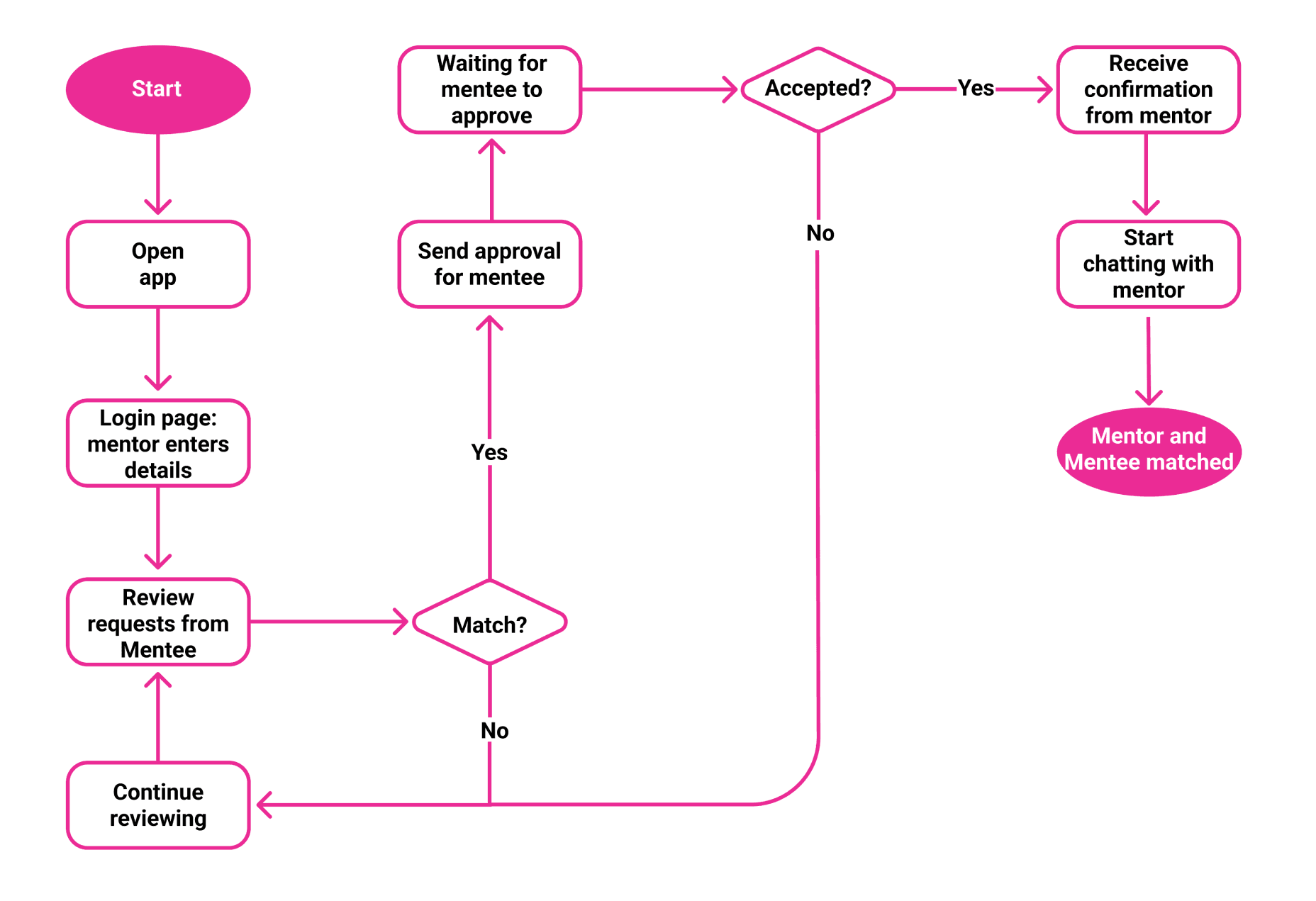
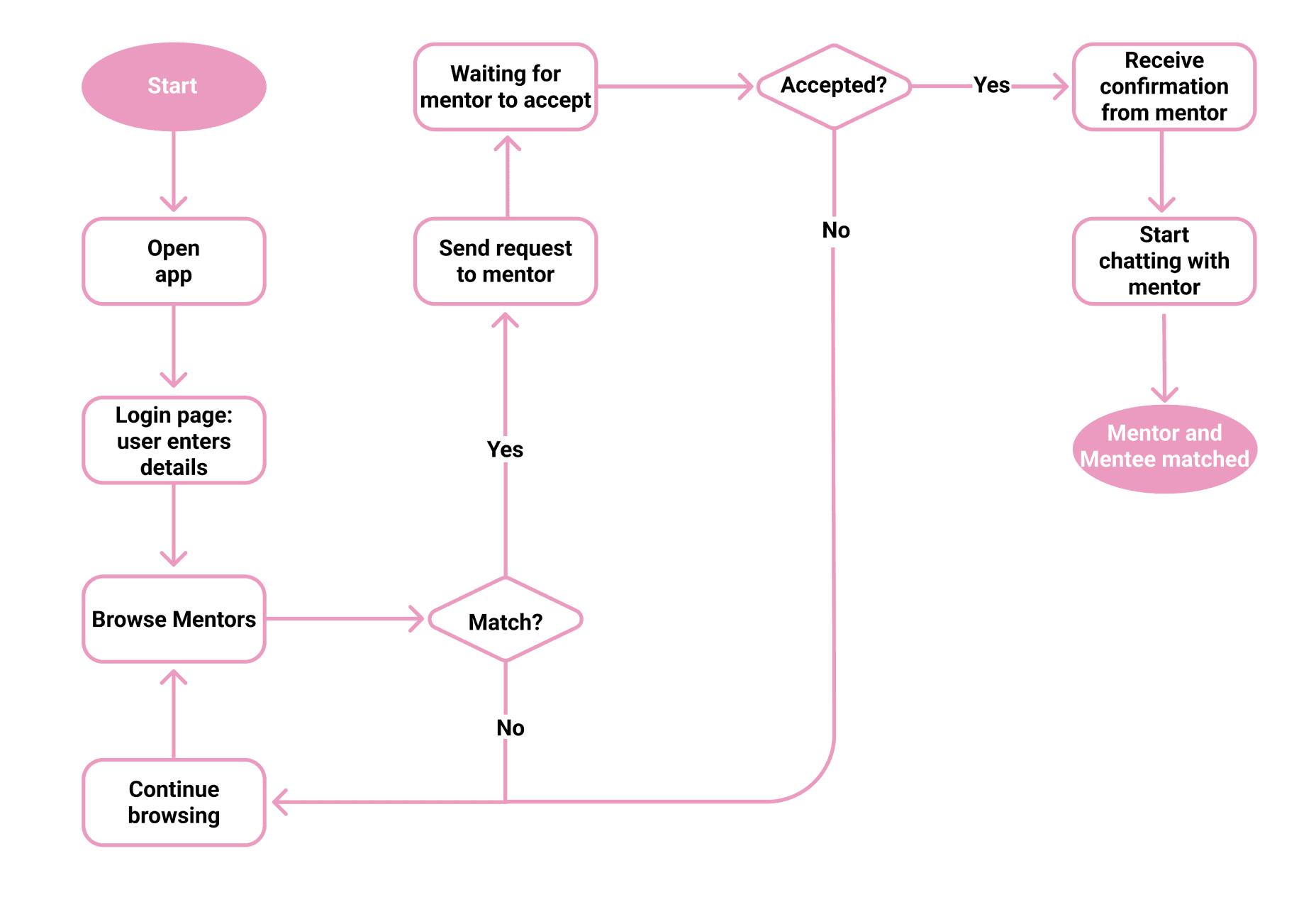
I then mapped the full user journeys for both the mentee and mentor journeys before a single screen was drawn. This revealed where the two journeys intersected (the mutual match review) and ensured no UI dead ends existed. This also helped communication between technical team members and non-technical client so that we were all on the same page of how we wanted the end product to work.
04_Design
From flows to high-fidelity designing the system, not just the screens
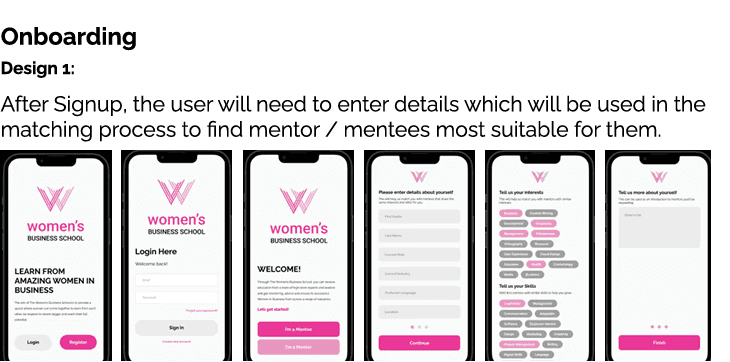
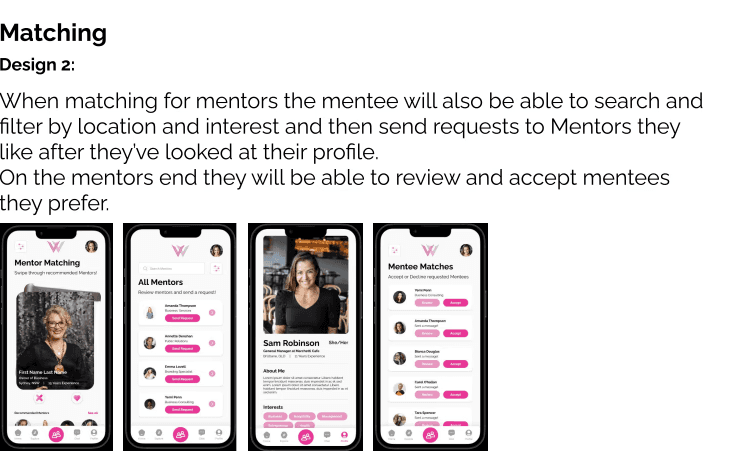
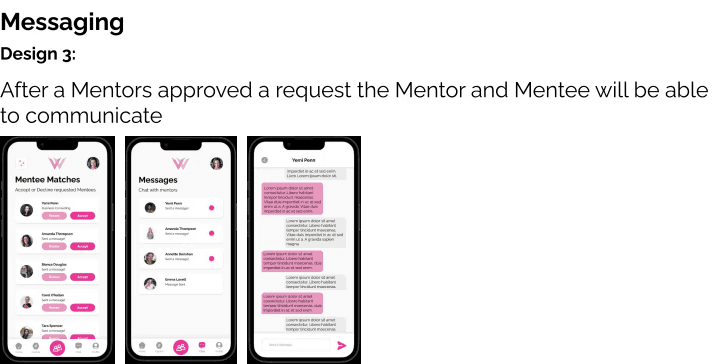
The process was deliberately iterative: task flows → mid-fidelity prototype → UI kit → high-fidelity screens. Each stage fed directly into the next, and testing happened before high-fidelity to keep feedback structural rather than cosmetic.
UI Kit & Style Guide
I built the UI kit before any high-fidelity screens. As both designer and front-end developer, this was the bridge between Figma and React Native consistent components in design meant consistent components in code.
Colour System
Typography
Raleway Bold
Raleway Regular - Body
Raleway SemiBold = Tags & Labels
Key Design Decisions
01
Carousel over swipe-only
Swiping felt too casual for professional mentorship. The carousel lets users browse cards and read full profiles before committing giving the interaction a deliberate, considered feel.
02
Tag-based profiles power the AI
Skills, industries, and interests selected during onboarding feed directly into the K-Nearest Neighbours matching algorithm. Showing tags on profiles also lets users see why a match was suggested.
03
Mutual consent before messaging
Mentee likes → mentor accepts or declines → messaging unlocks. This two-step model removed cold-outreach anxiety and gave mentors full control, directly addressing Emily's core frustration.
04
Simplified bottom navigation
3 of 5 test participants were confused by the original navigation. I redesigned to a clear 5-tab bottom bar Home, Mentors, Explore, Messages, Profile resolving the most critical usability failure before high-fi.
High Fidelity Screens
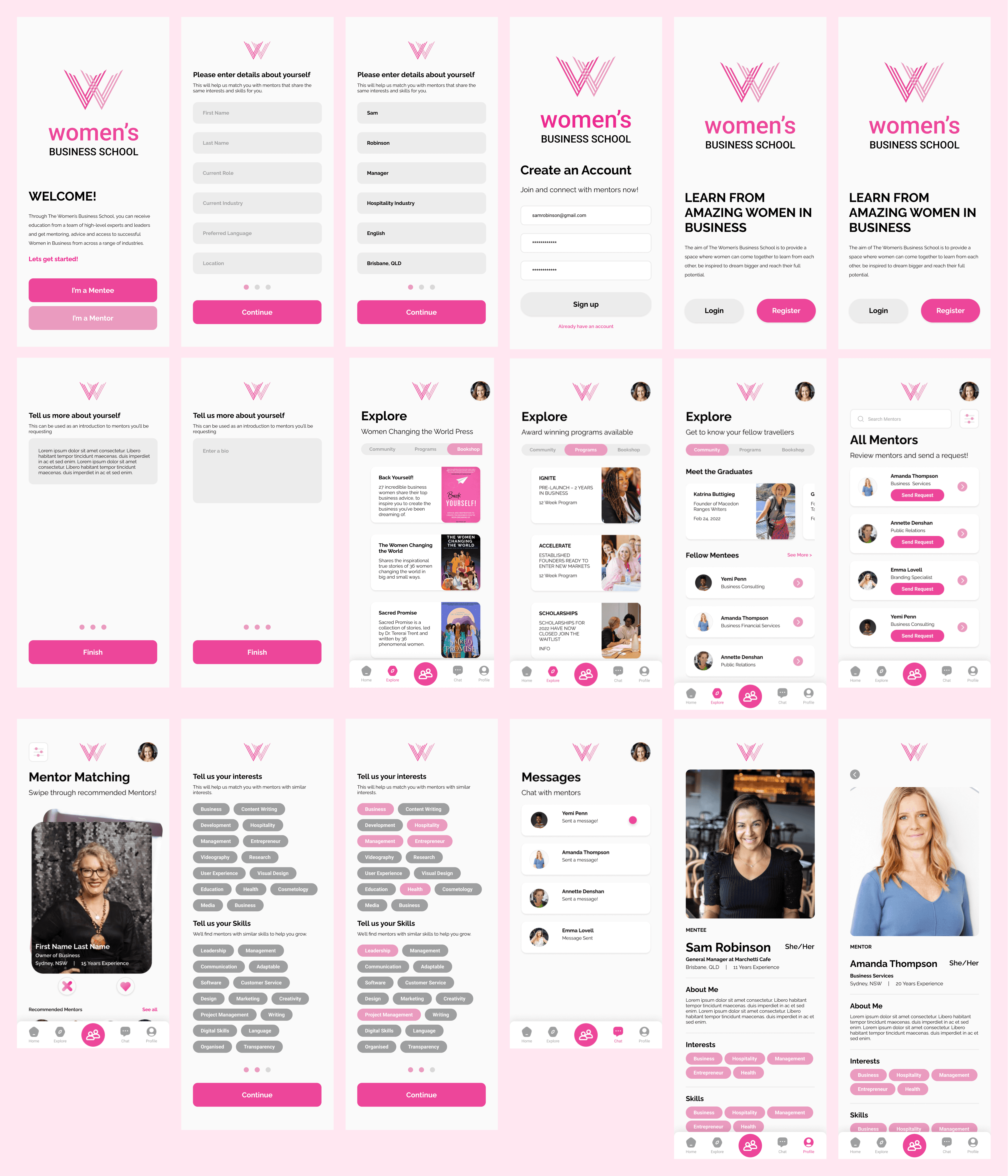
These screens were a success with the clients and were able to present a full rundown of the whole user journey using the UI screens instead of user flow diagrams.
05_Testing
What five real users revealed that we hadn't designed for
I conducted moderated usability testing with 5 participants (aged 22–45, mix of in-person and remote) using the high-fidelity prototype. Sessions used a think-aloud method, working through three core scenarios: sign-up and profile setup, finding a mentor, and initiating a message.
Key insights from testing
Navigation confusion
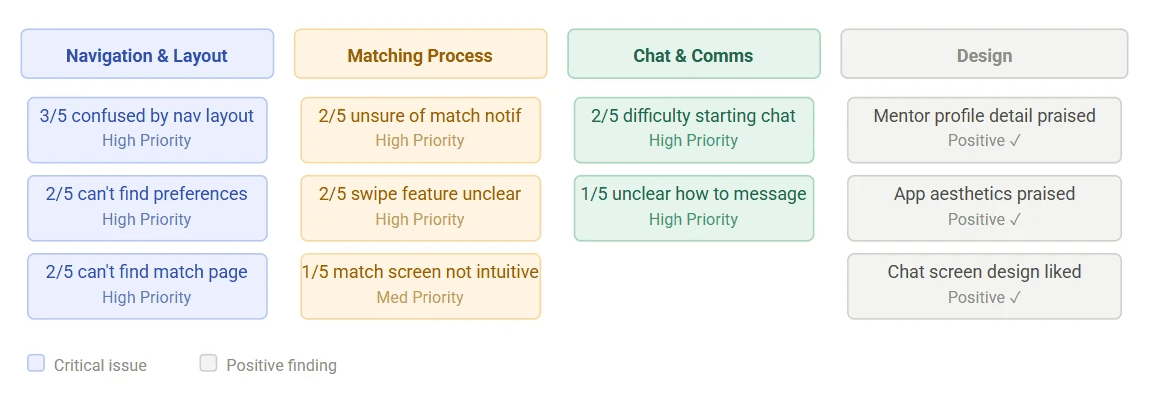
3 of 5 users couldn't locate the mentor matching screen. The navigation structure needed a full rethink labels alone weren't enough.
Chat initiation unclear
2 of 5 users struggled to start a conversation after matching. The link between "match accepted" and "message now" wasn't obvious in the flow.
Profiles rated highly
4 of 5 users felt they had enough information on mentor profiles to make a genuine decision validating the tag-heavy approach.
What the affinity map revealed
I documented observations across all 5 participants, then used an affinity map to cluster findings into patterns. This surfaced priority tiers not just a list of complaints, but a ranked picture of what was genuinely broken vs. what was minor preference.
Why affinity mapping?
With 5 participants generating dozens of observations each, patterns only emerge through clustering. The map turned noise into signal and gave the team a defensible, visual rationale for which issues to fix first.
Testing Participants
5 participants total
Age range: 22–45
Mix of in-person & remote
Mentorship-interested users
Think-aloud protocol
3 task scenarios
06_Outcome
What the prototype achieved and what it measured
Phase 1 concluded with a high-fidelity, functional prototype delivered to the client alongside a full handover package. Below are the results from usability testing and prototype evaluation. Note: live app metrics will be available following Phase 2 deployment.
METRIC
PRE-REDESIGN
POST-REDESIGN
CHANGE
Navigation task success rate
40%
100%
+60pts
Mentor profile comprehension
Mixed
4 / 5 positive
↑ Clear
Match initiation clarity
Unclear to 2/5
+ Intuitive
↑ Resolved
Client approval of design system
—
Approved
✓ Signed off
Handover package completeness
Incomplete
Full documentation
↑ Complete
Front-end screens built & functional
0 (inherited)
All Screens Done
↑ Delivered
07_Learnings
What I'd do differently, and what I'd do again
Phase 1 concluded with a high-fidelity, functional prototype delivered to the client alongside a full handover package. Below are the results from usability testing and prototype evaluation.
What worked
01
Testing at mid-fidelity kept feedback structural, not cosmetic we caught navigation issues before they were baked into code.
02
Building the UI kit before screens paid off in speed and consistency. As both designer and developer, it was the bridge between Figma and React Native.
03
Involving AI/ML developers in design reviews meant the matching algorithm and UI evolved together the tag system only works because both sides designed it jointly.
What I'd change
01
I'd push for a second usability testing round after the navigation redesign to validate the fixes we iterated on insight alone, without re-testing.
02
The competitive analysis was too narrowly focused on direct competitors. Looking at adjacent apps (dating, freelance platforms) earlier would have surfaced better matching UX patterns sooner.
What Next
Phase 2
Full development & deployment
Firebase integration, matching algorithm in production, end-to-end testing with real users.
Future
Post-match feedback loop
Mentees rate matches feeding back into the algorithm to improve future recommendations.
Future
Collaborative filtering & multi-language support
Use aggregate match data to improve recommendations; expand accessibility for WBS's international community.